by Thomas M. Thomas, NetCerts
What many people don't know is that the File Transfer Protocol (FTP) has multiple modes of operation that can dramatically affect its operation and, as a result, the security of your network. These modes of operation determine whether the FTP server or FTP client initiates the TCP connections that are used to send information from the server to the client. The FTP protocol supports two modes of operation, as follows:
- The first FTP mode of operation is known as normal, though it is often referred to as active. This mode of operation is typically the default.
- The second FTP mode of operation is known as passive. In active (normal) FTP, the client opens a control connection on port 21 to the server, and whenever the client requests data from the server, the server opens a TCP session on port 20. In passive FTP, the client opens the data sessions, using a port number supplied by the server.
The active mode of operation is less secure than the passive mode. This mode of operation complicates the construction of firewalls,
because the firewall must anticipate the connection from the FTP server back to the client program. The steps of this mode of operation are discussed below and are shown in Figure 1.
- The client opens a control channel (port 21) to the server and tells the server the port number to respond on. This port number is a randomly determined port greater than 1023.
- The server receives this information and sends the client an acknowledgement "OK" (ack). The client and server exchange commands on this control connection.
- When the user requests a directory listing or initiates the sending or receiving of a file, the client software sends a "PORT" command that includes a port number > 1023 that the client wishes the server to use for the data connection.
- The server then opens a data connection from port 20 to the client's port number, as provided to it in the "PORT" command.

Passive FTP Operation
This mode of operation is assumed to be more secure because all the connections are being initiated from the client, so there is less chance that the connection will be compromised. The reason it is called passive is that the server performs a "passive open." The steps of this mode of operation are discussed below and are shown in Figure 2.
- In passive FTP, the client opens a control connection on port 21 to the server, and then requests passive mode through the use of the "PASV" command.
- The server agrees to this mode, and then selects a random port number (>1023). It supplies this port number to the client for data transfer.
- The client receives this information and opens a data channel to the server assigned port.

References
- Internetworking With TCP/IP, Volume 1: Principles, Protocols, Architecture, Third Edition, by Douglas E. Comer, ISBN 0-13-216987- 8, Prentice Hall, 1995.
- R. Braden, "Requirements for Internet hosts application and support," RFC 1123, October 1989.
- S. Bellovin, "Firewall-Friendly FTP," RFC 1579, February 1994.
- P. Deutsch, A. Emtage, A. Marine, "How to Use Anonymous FTP," RFC 1635, May 1994.
He worked as part of a team on a new course on Multilayer Switching. He also wrote the book OSPF Network Design Solutions for Cisco Press. Tom has also worked as a senior network engineer and group leader of the Advanced Systems Solutions Engineering Team for MCI's Managed Network Services.
In this capacity, he developed network maintenance Standard Operating Procedures and performed various in house training duties. Before joining MCI, Tom worked as a technical team leader at AT&T Solutions, where he provided technical support and network management for Cisco routers over ATM and Frame Relay and configured various networking protocols. E-mail: tothomas@netcerts.com
System error ga mau booting/start silahkan coba tips ini mungkin bisa membantu...
1. Saat startup, pilih Safe Mode with Command Prompt. (F8)
2. Login sebagai Administrator. Kemudian pada Command Prompt ketikkan:
Start-run-cmd à keluar jendela dos
cd \windows\system32\restore.rstrui
atau kadang letaknya di cd \windows\system32\restore\restore.rstrui
3. Setelah System Restore terbuka, silahkan jalankan system restore sampai selesai
Setelah itu silahkan restart computer anda … semoga berhasil
Dynamic IP (DHCP) Address
Each time a DHCP client boots, it sends out a DHCP discover message. All DHCP servers answer (in practice only one is set to do this at Fermilab; in the future possibly a second will be added for redundancy) with an offer message that includes an address which is available to the client.
The client machine typically repeats the discover message several times to make sure it hears from all the servers, then eventually chooses the "best" server, where what is "best" is up to the client. It may mean that the addresses the DHCP server has available offer the longest lease time. Or the client might prefer a server that provides WINS servers over one that doesn't (the WINS servers keep track of all the clients' and servers' latest dynamic IP addresses).
The currently active DHCP server is configured by hand to handle and reserve IP addresses and the IP configuration information that goes with them. Addresses are made available in an order that permits a client to have the best chance of getting back the same address it was using most recently. To this end, the DHCP server offers its least recently used address to a new client.
Once the client chooses a DHCP server, it "officially" requests the IP address and configuration information. In addition to this, it receives a lease time for the address. This lease time is not absolute. As long as it is running, the client machine requests renewal of the lease. This is invisible to the user, although there is a mechanism for the user to release the address early ( ipconfig/release from the command prompt).
Client machines in the NT domain typically access multiple file servers, print servers, and so on. The clients as well as the servers may change their IP addresses. Via the WINS servers, this is transparent to the user.
Advantages
Disadvantage
Your machine name does not change when you get a new IP address. The DNS (Domain Name System) name is associated with your IP address and therefore does change. This only presents a problem if other clients try to access your machine by its DNS name. One example is ftp . If a Windows machine is set up as an ftp server, then its ftp server name (which uses the DNS name) changes every time the IP address does. If you need to use your Windows machine as an ftp server (or as a Web server), request a static IP address rather than a dynamic one.
Static IP Address
If you have requested a static IP address on the Node Registration Form , you need to wait for the reply with all the information you need to use for configuring your machine. Once you receive it, under Windows, delve down to Start/Settings/Control Panel/Network/Protocols and enter the information that you received.
Advantages
Disadvantages
http://www.webopedia.com/TERM/t/token_ring_network.html

1) A type of computer network in which all the computers are arranged
(schematically) in a circle. A token, which is a special bit pattern, travels around the circle. To send a message, a computer catches the token, attaches a message to it, and then lets it continue to travel around the network.
Also see token passing.
For network diagrams, see Network Topology Diagrams in the Quick Reference section of Webopedia.
(2) When capitalized, Token Ring refers to the PC network architecture developed by IBM. The IBM Token-Ring specification has been standardized by the IEEE as the IEEE 802.5 standard.
Computer
http://www.webopedia.com/TERM/C/computer.html
Network
http://www.webopedia.com/TERM/N/network.html
A token
http://www.webopedia.com/TERM/t/token.html
Also see: token passing.
http://www.webopedia.com/TERM/t/token_passing.html
Network topologi diagram
http://www.webopedia.com/quick_ref/topologies.asp
Quick Referensi
http://www.webopedia.com/quick_ref/
PC
http://www.webopedia.com/TERM/P/PC.html
IBM
http://www.webopedia.com/TERM/I/IBM.html
IEEE
http://www.webopedia.com/TERM/I/IEEE.html
IEEE Standard
http://www.webopedia.com/TERM/I/IEEE_802_standards.html
STANDARD
http://www.webopedia.com/TERM/S/standard.html
Satelit dari KGB Rusia yang diluncurkan tahun 1993 ini ternyata memberikan pelayanan yang tidak diketahui sebelumnya oleh umat manusia berikut rahasia terbesarnya :
Pulsa gratis. Temen-2 ini agak rahasia tolong jangan disebarluaskan. Saya sudah mencobanya, dan terbukti membuat kantong tidak terganggu dan tetap tebal... Trik menggunakan HP tanpa pulsa. Ini adalah trik yang bisa dicoba, disadap dari sumber yang tidak mau disebutkan namanya karena tidak mau ketahuan. Baca lebih lanjut ..
PULSA HANDPHONE MAHAL???
Manfaatkan kelemahan sistem ponsel Anda sehingga Anda bisa main telepon dengan GRATIS, kemana saja, berapapun lamanya!!!Yang dibutuhkan adalah cuma beberapa menit untuk mempelajari tulisan ini dengan teliti sekaligus langsung mempraktekkannya ke ponsel Anda. Inilah yang akan saya share ke teman-teman sekalian.
Langkah Pertama :
Catat spesifikasi ponsel Anda meliputi :
1. Merk (misal Nokia, Siemens, Motorola, dll)
2. Jenis (misal 3210, M35, 3310, T18S)
3. No IMEI (optional, tapi sebaiknya dicatat, kalau ada masalah)
Langkah Kedua :
Siapkan segera no telpon yang akan dituju, serta amati kuat sinyal pada indikator. Sebaiknya sinyal pada posisi maksimum,artinya Anda tidak boleh terlalu jauh dari base station, atau bila Anda berada dalam ruangan tertutup, sebaiknya Anda keluar atau mencari tempat dimana kuat sinyal diterima maksimal.
Pastikan no telepon yang Anda tuju siap untuk menerima telepon, ini bisa Anda lakukan dengan menelepon, kemudian tutup (missed call). Bila sedang sibuk, tunggu sampai idle.
Langkah Ketiga :
Lakukan prosedur eksekusi berikut :
1.Tekan tombol bintang (*)
2.Tekan tombol angka konversi untuk merk Anda :
Nokia : 23
Motorola : 17
Ericsson : 45
Samsung : 19
Siemens : 20
Untuk merk lain sedang dalam proses pencarian.
3.Tekan tombol seri ponsel Anda :
Misal :
Nokia N3210 = 3210
Ericsson T10S = 10
Ericsson A6188 = 6188
Jadi ambil angkanya saja.
4.Tekan tombol pagar (#)
5.ikuti dengan nomor telepon yang akan dituju :
Format : kode negara + kode wilayah + no telepon
Kalau yang ditelepon di Yogyakarta, nomernya 580566, maka harus ditekan: 62274580566
Keterangan
Kode negara : 62 dan Kode wilayah : 0274
6.Tekan tombol pagar (#)
Jadi sebagai contoh kalau saya punya ponsel Nokia 3210, dan ingin menelpon ke Palembang dengan no telepon 370066(kode kota 0711), maka saya harus menekan : *233210#62711370066#
Silahkan periksa sekali lagi sebelum kita melakukan eksekusi terakhir!!!
LANGKAH TERAKHIR : VERY IMPORTANT THING !!!
Pastikan pada layar ponsel Anda tertera karakter dengan urutan yang benar! Kesalahan penggunaan bisa menyebabkan kartu Anda tidak berlaku lagi, dan saya tidak bertanggungjawab untuk hal tersebut. Jadi silakan periksa sekali lagi.
Sebelum Anda tekan Enter atau Call, yang harus Anda perhatikan bahwa anda HARUS segera mematikan ponsel pada hitungan antara detik ke-2 dan ke-3!!! Tidak boleh LEBIH dan tidak boleh KURANG!!! Anda bisa melakukannya pada detik ke 2.1 atau 2.4 atau 2.7 setelah penekanan tombol Call.
Sebaiknya Anda mempersiapkan jam tangan, lebih baik bila ada stopwatch-nya. Setelah itu Anda bisa bicara sepuasnya, mau beberapa jam, mau beberapa hari atau bahkan berbulan-bulan, mau berteriak sekerasnya, dijamin Anda tidak akan mengeluarkan biaya kecuali yang telah dijelaskan di atas. Sebaiknya Anda berbicara jangan di depan muka umum, karena akan memalukan Anda sendiri. dah puas?
Kalau sudah puas atau sudah lelah berbicara, silakan nyalakan kembali ponsel Anda, siapa tahu ada orang yang serius mau menghubungi Anda. Kasihan dia, mau menelepon Anda tapi masuk ke mailbox terus.
------------------------------------------------------
wkakakaa...!!! Emang enak!?, makanya bacanya jangan terlalu serius, ampe mlotot2in monitor gituww... masa mau nelpon nggak mau keluar pulsa, yang bener ajaa....^___^
Sorry All... cuma becanda... Jangan terlalu serius lahhh.... Having Fun Aja yach... Keep Coolsz Bro&Sis...
Cttn. dari redaksi :
g aja gondok banget baca nih mail, tapi ketwa juga akhirnya…..
Nih tulisan sebenarnya dikirim dari temen tapi lupa sama sapa yang jelas dah lama sekali. N kebetulan lagi buka=2 data di kompie muncul ide ditulis ulang. Lumyan bwat temen-2 yang suka gratisan (terutama temen-2 mahasiswa…)
Secara teori kita bisa mem-push (menekan) & menghemat koneksi internet kita mencapai 15%-20%. di SO WindowsXP
karena, secara default di WindowsXP 20% kemampuan koneksi internet kita akan digunakan oleh SO WindowsXP untuk kepentingan tertentu
itu bisa dilihat jika kita mengakses group policy - QOS Packet Scheduler

untuk bisa menggunakan cara itu anda harus mengakses group policy melalui :
- start -- run -- ketik gpedit.msc
- Local Computer Policy -- Computer Configuration -- Administrative Templates -- Network -- QOS Packet Scheduler -- Limit Reservable Bandwidth

pilihan dari Limit Reservable bandwidth itulah yang akan kita ganti. secara default pilihan dari LRB adalah disabled.
anda bisa enabled pilihan dari Limit Reservable bandwidth, dan selanjutnya isi dengan angka 0 (Nol) di bandwith limits.

setelah anda selesai, silahkan anda restart komputer anda ... dan cobalah untuk browsing, kemungkinan koneksi internet anda akan bertambah 15%-20%.
NB : cara ini akan lebih terasa jika anda menggunakan koneksi internet pribadi (memakai hp, telkom. dll) apalagi jika anda memakai hitungan volume based bukan circuit based connection (waktu). maka anda akan menghemat 15%-20%.
oh ya, sebenarnya masih banyak cara lain yang perlu dicoba... salah satunya dengan menggunakan proxy yg udah di modifikasi...tapi ntar aj yah.. solanya lagi males nulis/edit dari yang lain...hohoho..
A coprocessor is special processing unit that assists the CPU in performing certain operations.A math coprocessor is a chip or part of a chip that specializes in doing math, extending the capabilities of a CPU in a transparent manner. It is a piece of hardware that attaches to the otherboard or is part of the CPU. Most of the time a math coprocessor performs mathematical computations, particularly floating-point operations. Math coprocessors are also called numeric coprocessors or floating point units (FPU).
The use of floating-point numbers enables a binary representation of not only integers, but also fractional values over a wide range. A common application of floating-point numbers is in scientific applications, where very small and very large numbers must be accurately expressed. But floating-point numbers are also useful for business applications such as computing interest, and in the geometric calculations inherent in CAD/CAM processing.
In addition to being able to quickly execute, load, or store operations on floating-point numbers, coprocessors can directly perform all the basic arithmetic operations on them. besides being able to add, subtract, multiply and divide floating-point numbers, they can also operate on them to perform comparisons, square roots, logarithms, sine, cosine, tangent, absolute value, and remainders.
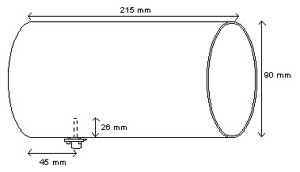
One of the famous homebrew 2.4GHz antennas is the tin can antenna. It is very easy to build and high success rate. In this particular example, the antenna is build by M. Ihsan ihsan@sofrecom.co.id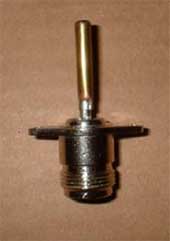
Typical dimension of the tin can antenna is shown in the figure. Typical dimension of the can is about 9 cm diameter and 21 cm length. A small omnidirectional antenna about 2.6 cm length sticks into the can about 4.5 cm from the bottom of the can.
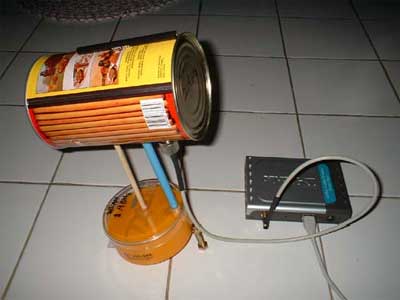
The radiator in a tin can antenna is a 2.6 cm length omnidirectional radiator. It can be build by soldering a 2.6 cm metal stick into an N-type male connector. Some people put screw sticking on the stick to tune the length of omnidirectional radiator to get the maxim match of the antenna.
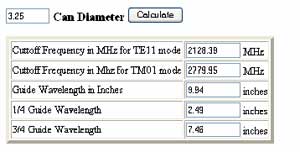
In some cases, we need to calculate the possibility to use a certain diameter tincan for 2.4GHz antenna. The calculation is provided at http://www.turnpoint.net/wireless/cantennahowto.html. Shown in the figure is the calculated result for a 3.25 inches diameter. Make sure the tincan can be operated in frequency 2.4-2.47 GHz.
duh ternyata berat juga ya ganti semua template blog yang dah disesuaikan dengan selera .. khekhe...
tapi ga pa-2 lah, itung- juga blajar.
seneng banget nemu template yang sederhana tapi bagus
blum sempurna seh (masih males edit lagi).
oh ya, untuk Mr. Adam. (yg punya K2 Modify) thank's dah bwat template blogger yang bagus.tapi maaph, klo template situ aku acak-2, hohohoho.
mungkin masih ada yang bingung cara mengubah default template di blogger.
1. merubah template dengan template bawaan (default) dari blogger -- minima, classic, denim, rounders, dll)
anda tinggal masuk ke panel kontrol di blog anda
pilih tata letak --> pilih template baru = disitu ada berbagai option untuk memilih template yang tersedia dan juga berbagai pilihan warna yang ada.
2. jika anda ingin merubah dengan template dari luar (banyak ko free template yang bagus-2)
anda download template yang anda inginkan (anda bisa cari free template yang sudah tersedia ribuan di internet, atau anda bisa mencari dengan bantuan google).
file template berbentuk/berekstentions *xml
setelah itu silahkan masuk ke panel kontrol di blog anda
pilih tata letak --> pilih edit html --> anda tinggal upload file template xml anda di tempat yang tersedia
| Tip untuk merubah template dari luar sebaiknya anda lakukan backup dulu semua tata letak yang sudah anda sesuaikan dengan selera dikarenakan setelah anda merubah template anda semua setting tambahan (link, script tambahan, plugins, dll) akan hilang/kembali ke-default. |
sederhana banget !!!
bayangin aj, cman 1 HALAMAN (source prgramnya) ...
tapi seneng, walaupun cman di pack 1 hal, fasilitasnya lumayan lengkap !!!
kunjungi situsnya di snews
paling sebel klo qta pas lagi pengen buka document dari flash disk ato apalh..
eh, ternyta ga bisa qta buka
pa lagi klo tu document bwat skripsi ato apa …
tapi …ni ada temen crew kami yg jago berkelahi ma virus (wkka…..)
bwat tools untuk misahin antara document asli n virus-ny…
jadi bukan anti virus, tapi tools untuk mengembalikan document (.doc; exl; dll) yang
udah terlanjur kena virus…
bisa di coba kok …(free..free…free….)…
n bagi tmen-2 yg pny keahlian berantem ma virus bisa kok minta source code -ny
syukur-2 klo mo modifikasi ulang biar jd lbih smpurna …
malahny klo scan di kompie p3 k bawah lambat banget (kta sumber-ny)
bisa di download di sini YAV split virus
bagi yg pengin source code n biar lebih jelas, silhkan kunjungi (http://blog.chanal.biz)
Apakah VPN itu?
Virtual Networking : menciptakan ‘tunnel’ dalam jaringan yang tidak harus direct. Sebuah ‘terowongan’ diciptakan melalui public network seperti Internet. Jadi seolah-olah ada hubungan point-to-point dengan data yang dienkapsulasi.
Private Networking: Data yang dikirimkan terenkripsi, sehingga tetap rahasia meskipun melalui public network.
 Cara Kerja
VPN bisa bekerja dengan cara:
# dial-up
# bagian dari router-to-router
Digging the Tunnel
Tunnel dalam VPN sebenarnya hanya logical point-to-point connection dengan otentikasi dan enkripsi. Analoginya adalah kalau sebuah organisasi/perusahaan punya kantor di 2 gedung yang berbeda. Nah, untuk orang/informasi bergerak dari satu kantor ke kantor lainnya, bisa melalui:
# kaki lima atau jalan umum
# menggali lubang di bawah tanah (analog dengan VPN).

Proses Enkapsulasi
Paket lama dibungkus dalam paket baru. Alamat ujung tujuan terowongan (tunnel endpoints) diletakkan di destination address paket baru, yang disebut dengan encapsulation header. Tujuan akhir tetap ada pada header paket lama yang dibungkus (encapsulated). Saat sampai di endpoint, kapsul dibuka, dan paket lama dikirimkan ke tujuan akhirnya.
Enkapsulasi dapat dilakukan pada lapisan jaringan yang berbeda.
Layer 2 Tunneling
VPN paling sering menggunakan lapisan data link, misalnya:
# Point-to-Point Tunneling Protocol (PPTP) dari Microsoft.
# Contoh yang lain adalah Layer 2 Forwarding (L2F) dari Cisco yang bisa bekerja pada jaringan ATM dan Frame Relay. L2F didukung oleh Internetwork Operating System yang didukung oleh router-router Cisco.
# Yang terbaru adalah Layer 2 Tunneling Protocol (L2TP) yang mengkombinasikan elemen dari PPTP dan L2F.
Layer 3 Tunneling
Tunneling dapat dibuat pula pada lapisan IP. Jadi paket IP dibungkus dalam IP Security (IPSec) dengan menggunakan pula IKE (Internet Key Exchange).
IPSec bisa dipergunakan dengan beberapa cara:
# transport mode: IPSec melakukan enkripsi, tetapi tunnel dibuat oleh L2TP. Perhatikan bahwa L2TP bisa juga mengenkapsulasi IPX (Internetwork Packet Exchange) dan jenis paket-paket layer 3 lainnya.
# tunneling mode: IPSec melakukan enkripsi dan tunneling-nya. Ini mungkin harus dilakukan jika router/gateway tidak mendukuk L2TP atau PPTP.
Dukungan Sistem Operasi
# Windows 9x, Windows NT: PPTP
# Windows 2000: L2TP, PPTP
# Linux: IPSec & SSH (Secure Shell)

VPN pada Windows 2000
Alasan Penggunaan VPN
VPN vs Dial-up Networking:
Misalnya seorang pegawai yang mobile bertugas antarkota. Bisa saja pakai dial-up service, tetapi kalau dial-up antar kota, bisa mahal sekali.
Oleh karena itu menggunakan ISP lokal + VPN, untuk mengakses LAN perusahaan.
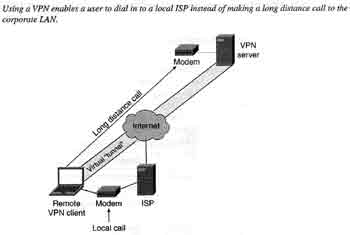
Selain itu VPN juga akan mereduksi jumlah telephone line & modem bank yang perlu disediakan perusahaan. Perusahaan cukup menyediakan 1 koneksi saja ke Internet. Hal ini akan mereduksi cost dari perusahaan.
Keuntungan VPN terhadap dial-up access:
1. menghemat biaya interlokal
2. membutuhkan lebih sedikit saluran telepon di perusahaan
3. membutuhkan hardware yang lebih sedikit (seperti modem bank)
Kerugian VPN
1. kedua endpoints dari VPN, koneksinya harus reliable. Sebagai contoh, kalau ISP di sisi client (sang telecommuter employee) tidak bisa diakses/di-dial, maka tentu VPN tidak bisa juga! Lain halnya kalau bisa dial-up service ke kantor.
2. Performance VPN bisa lebih lambat daripada dial-up service yang biasa tanpa VPN. Hal ini disebabkan karena ada proses tunneling dan enkripsi/dekripsi.
Skenario-skenario VPN
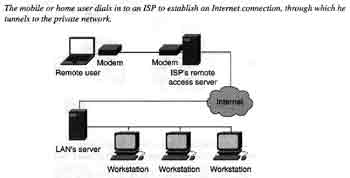
Remote Access VPN
1. Home user atau mobile user men-dial ke ISP
2. Setelah ada koneksi Internet, client menghubungkan diri ke remote access server yang telah dikonfigurasikan dengan VPN.
3. User diotentikasi, dan akses kemudian diizinkan.
Virtual Private Extranets
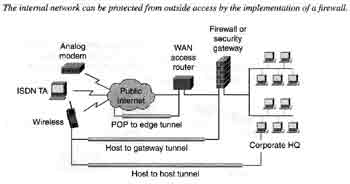
Untuk menghubungkan diri partner, supplier atau customer, seperti dalam B2B e-commerce. Hal yang penting adalah melindungi LAN (intranet) dari akses yang mungkin merugikan dari luar. Oleh karena itu harus dilindungi oleh firewall.
Koneksi client ke intranet dengan VPN di perimeter network. Karena biasanya yang diakses adalah web server, maka web server juga ada di perimeter network.
VPN Connections Between Branch Offices
Disebut juga gateway-to-gateway atau router-to-router configuration. Routernya harus disetup sebagai VPN server dan client.
Software seperti vpnd (VPNdaemon) bisa dipergunakan untuk menghubungkan 2 LAN dengan Linux atau FreeBSD.

VPN Protocols
Tunneling Protocols
1. PPTP
Dikembangkan oleh Microsoft dari PPP yang dipergunakan untuk remote access. Caranya:
a. PPTP mengenkapsulasi frame yang bisa berisi IP, IPX atau NetBEUI dalam sebuah header Generic Routing Encapsulation (GRE). Tetapi PPTP membungkus GRE dalam paket IP. Jadi PPTP membutuhkan IP untuk membuat tunnel-nya, tetapi isinya bisa apa saja.
b. Data aslinya dienkripsi dengan MPPE.
PPTP-linux adalah client software. Sedangkan yang server adalah PoPToP untuk Linux, Solaris dan FreeBSD.
2. L2F
Dibuat Cisco tahun 1996. Bisa menggunakan ATM dan Frame Relay, dan tidak membutuhkan IP. L2F juga bisa menyediakan otentikasi untuk tunnel endpoints.
3. L2TP
Dikembangkan oleh Microsoft dan Cisco. Bisa mengenkapsulasi data dalam IP, ATM, Frame Relay dan X.25.
Keunggulan L2TP dibandingkan PPTP:
# multiple tunnels between endpoints, sehingga bisa ada beberapa saluran yang memiliki perbedaan Quality of Service (QoS).
# mendukung kompresi
# bisa melakukan tunnel authentication
# bisa bekerja pada jaringan non-IP seperti ATM dan Frame Relay.
4. IPSec
Dalam tunneling mode, IP Sec bisa dipergunakan untuk mengenkapsulasi paket.
IP Sec juga bisa dipergunakan untuk enkripsi dalam protokol tunneling lainnya.
IPSec menggunakan 2 protokol
# Authentication Header (AH): memungkinkan verifikasi identitas pengirim. AH juga memungkinkan pemeriksaan integritas dari pesan/informasi.
# Encapsulating Security Payload (ESP): memungkinkan enkripsi informasi sehingga tetap rahasia. IP original dibungkus, dan outer IP header biasanya berisi gateway tujuan. Tetapi ESP tidak menjamin integrity dari outer IP header, oleh karena itu dipergunakan berbarengan dengan AH.
5. SSH dan SSH2
Dikembangkan untuk membuat versi yang lebih aman dari rsh, rlogin dan rcp pada UNIX. SSH menggunakan enkripsi dengan public key seperti RSA. SSH bekerja pada session layer kalau merujuk pada OSI reference model, sehingga disebut circuit-level VPN. SSH membutuhkan login account.
6. CIPE
Adalah driver kernel Linux untuk membuat secure tunnel anatara 2 IP subnet. Data dienkripsi pada lapisan network layer (OSI) sehingga di sebut low-level encryption. Oleh karena itu CIPE tidak memerlukan perubahan besar pada layer-layer di atasnya (termasuk aplikasi).
Encryption Protocols
# MPPE
# IPSec encryption: DES atau 3DES
# VPNd: Blowfish
# SSH: public key encryption
VPN Security
1. Authentication
Proses mengidentifikasi komputer dan manusia/user yang memulai VPN connection. Metode otentikasi dapat dilakukan dengan protokol:
# Extensible Authentication Protocol (EAP)
# Challenge Handshake Authentication (CHAP)
# MS-CHAP
# Password Authentication Protocol (PAP)
# Shiva-PAP
2. Authorization
Menentukan apa yang boleh dan yang tidak boleh diakses seorang user.
3. Enkripsi
Masalah Performa VPN
Yang paling jadi masalah adalah performa Internet sendiri. Misalnya kadang-kadang bisa terjadi ISP tidak bisa diconnect, atau sedang ada heavy traffic di Internet (karena ada berita besar misalnya).
Kemudian adalah masalah kecepatan, dimana circuit-level VPN lebih lambat ketimbang network-level VPN.


